





To provide a more professional and streamlines experience for our players, we are moving toward a Unified Identity System. We don't want to deal with the confusion of users having one name in-game, another on the forums, and a third on Discord. We are bridging that gap. This update ensures that staff ranks, player permissions and identity are consistent across all platforms.
If you already have a forum account, follow these steps immediately to ensure you don't lose access:
- Streamlined Moderation: By linking accounts, staff can assist you faster and we can instantly verify your forum and discord status.
- Automatic Role Sync: No more waiting for a member of the Leadership Team to give you your "Staff" or "Donator" tags. The moment your rank changes on the forums, it will sync to Discord automatically.
- Universal Naming: This system enforces a single identity. It helps prevent impersonation and makes it easier for you to find and communicate with other members.
- Enhanced Security: Forum accounts can now be protected by Discord’s Two-Factor Authentication (2FA), a massive layer of protection for your forum account.
- Phase 1 (Starting Now): Registration is now Discord-Only. New users must use their Discord account to join. Existing members will have 30 Days to link their accounts manually.
- Phase 2 (The Cutover): On 1st May, standard email/password logins will be disabled. If your account is now linked by then, you will be locked out of your account and will need to contact a Forum Coordinator to have it manually associated.
How to sync your account
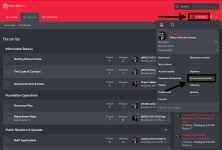
If you already have a forum account, follow these steps immediately to ensure you don't lose access:- Navigate to Settings: Click your username in the top right and select "Connected accounts".
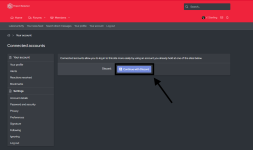
- Associate Discord: Click the Continue with Discord button next to the Discord icon.
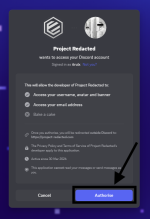
- Authorize: Follow the Discord prompt to link your ID to your forum profile.
- Verify: Once linked, you will see your Discord name listed in your settings. (Some users may need to enter their password).